Build & prototype · Working with agents
From design brief to reviewable prototype: inference and the agent harness
Use a bounded prototype exercise to understand inference, agent harnesses, tool checks, and the human research still needed. Includes a copyable design task card.
In this guide
- What does an agent harness change in a design workflow?
- Separate the model from the workflow around it
- Describe: one decision, four visible states
- Create: give the agent an inspectable task
- Deliver: review behavior with concrete evidence
- Keep AI review and human research separate
- Repeat with a useful handoff
- Sources and further reading
What does an agent harness change in a design workflow?
The model generates proposals during inference. The harness connects those proposals to project context, tools, permissions, and a continuing workflow. For designers, the useful result is a prototype with inspectable states, recorded checks, and clearly labeled assumptions. AI self-review can help find issues; it cannot establish that real people understand or want the design.
A prototype can look finished while its most important behavior remains undefined. What happens when the selected appointment disappears? Does an error preserve the user’s choice? Has anyone checked the path with a keyboard?
An agent can help build and inspect those details, provided the task has a clear boundary. This workshop uses a fictional repair-booking service to turn an ordinary design brief into something a colleague can review. The aim is a small, testable artifact and a clear account of what remains unknown.
Separate the model from the workflow around it
Inference means running a trained model on new input. In this exercise, that input might include a brief, existing components, and a failed interaction check. The output might be a layout proposal, code, or a request to inspect a file. Ordinary inference does not update the model’s learned parameters; training is a different process.
An agent harness manages the surrounding session: preparing context, coordinating available tools and permissions, returning tool results, and tracking state. The same model can produce different practical outcomes when its tools, instructions, or context differ.
A task card helps describe that workflow. It is not a substitute for actual tool access or permission enforcement. A model that suggests a browser check has not necessarily performed one.
Describe: one decision, four visible states
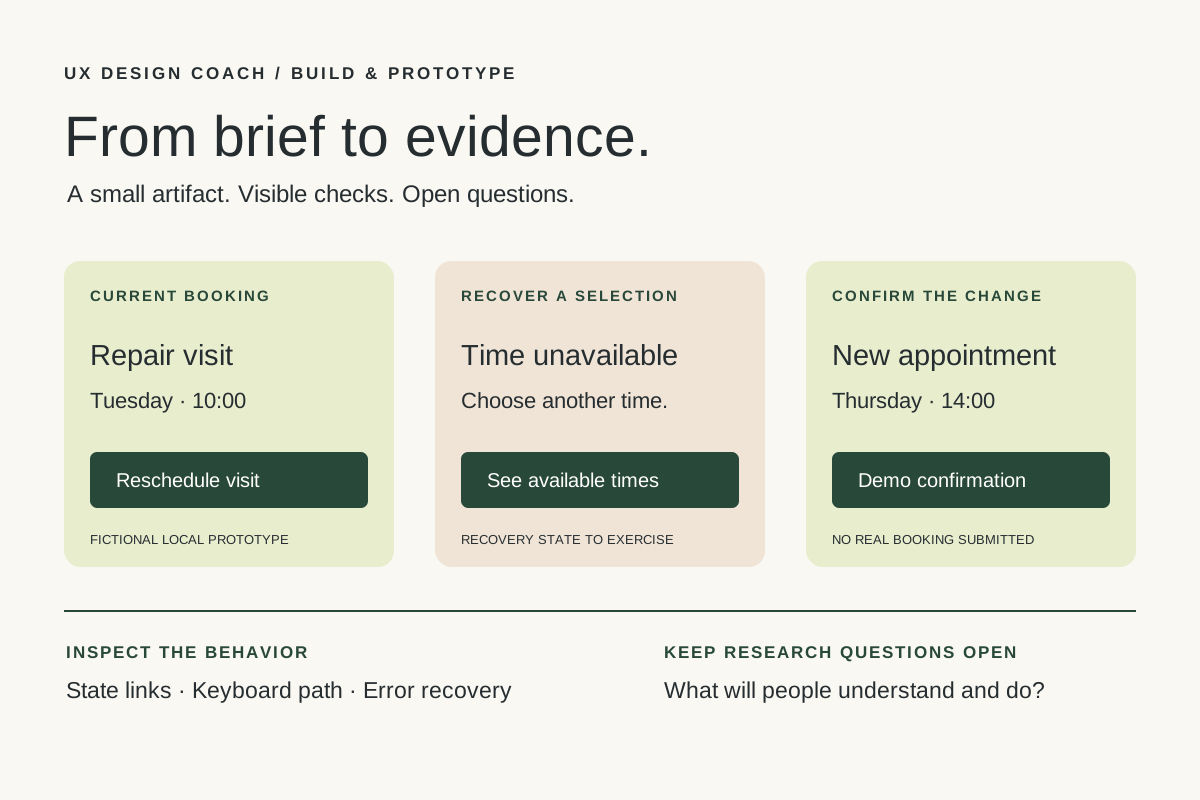
Our fictional service lets customers reschedule a repair visit. Work in a duplicate prototype or isolated project. Use invented appointment details and local fixture data; this exercise does not connect to a real booking system.
Frame the decision this way: “Can someone choose another available appointment, recover when it becomes unavailable, and tell whether the change was confirmed?”
Limit the prototype to four states:
- Current booking: show the existing appointment and a clear reschedule action.
- Choose another time: make available and unavailable options distinguishable.
- Unavailable after selection: explain the conflict, preserve useful context, and offer another choice.
- Confirmation: show the new appointment and distinguish it from the old one.
Do not add accounts, payments, reminders, or a complete scheduling product. Scope is part of the design: fewer behaviors make the remaining questions easier to examine.
Create: give the agent an inspectable task
Provide the existing component examples, content rules, and the precise file or frame where work should happen. If those do not exist, identify them as assumptions. Then adapt this task card.
Build a fictional repair-appointment rescheduling prototype.

Work only in the duplicate project specified below.
Inspect its existing structure and components first.
Use local fixture data and label the prototype as a demo.

Implement four states:
current booking, choose a time, selected time unavailable,
and confirmed change.

Acceptance criteria:
- Every interactive control has a clear accessible name.
- The primary path works with a keyboard.
- A failed selection offers a recoverable next step.
- Confirmation identifies the new appointment.
- No real booking, message, or payment is submitted.

Use the tools actually available. Save the artifact.
Check the states you can exercise and record the evidence.
Label unperformed checks "not run"; do not infer a pass.
Stop after two repair attempts and report remaining issues.

Deliver:
artifact location, changed files/frames, checks performed,
known limitations, assumptions, and questions for user research.
The model may now request a read, propose edits, inspect a preview, and revise after an error. The harness coordinates the available actions. If the assistant only returns text, turn that into a manual implementation plan; record the steps a person performs.
Deliver: review behavior with concrete evidence
Use a small review matrix. The following rows are proposed checks, not claims that this example has been built or tested.
| Check | Evidence to keep | What it cannot establish |
|---|---|---|
| All four states exist | Links or frames showing each state and its entry path. | Whether the sequence matches people’s expectations. |
| Keyboard path works | Observed focus order and activation results in the running prototype. | Complete accessibility conformance. |
| Conflict is recoverable | A run using the unavailable-slot fixture, including the next successful action. | Whether real customers understand the explanation. |
| Confirmation is truthful | Visible demo labeling and matching local fixture state. | A real booking or production integration. |
Anthropic’s guidance on agent evaluations emphasizes checking outcomes. For this task, inspect the actual prototype and observed interactions, alongside the agent’s report. A screenshot can show a state; it cannot prove that the control leading to it works.
If a check fails, describe the observed behavior precisely: “After the unavailable-slot message, keyboard focus disappears,” for example. Ask for a bounded correction and repeat that check. Record anything still unresolved instead of expanding the scope.
Keep AI review and human research separate
Ask the assistant to look for inconsistent labels, missing states, unsupported claims, and mismatches with the brief. These are useful inspection prompts. Its answers remain suggestions to verify.
Human research addresses a different question: what happens when an appropriate participant encounters the flow with their own expectations? A proposed task might be, “Your visit is booked for Tuesday, but you need a different time. Show what you would do.” Avoid telling the participant which button to choose.
Observe where they hesitate, what they believe changed, and how they interpret the conflict. Keep observations separate from your interpretation. One successful session does not establish that the design works for everyone. Choose the next research step according to the decision and the uncertainty that remains.
For a fuller method, use our user-testing evidence workshop. AI-generated personas or simulated responses can help you prepare questions; they are not observations from actual participants.
Repeat with a useful handoff
Save the brief, prototype version, checks, and open questions together. Research on longer agent tasks describes the value of explicit progress artifacts across sessions. For design work, that suggests a practical habit: make the next review possible without reconstructing an entire conversation.
Multiple agents are optional. A separate reviewer may offer another inspection pass, but two agreeing model responses do not create independent user evidence.
PROTOTYPE REVIEW HANDOFF
Decision this prototype supports:
Artifact and version:
Fixture data / demo limitations:
States implemented:
Checks run and evidence:
Checks not run:
Known defects:
Assumptions still untested:
Observed participant behavior, if research was conducted:
Next question and responsible person:
Continue with the Figma MCP workshop if your work starts in Figma, or the guide to preserving the research trail. Describe. Create. Deliver. Repeat. Each cycle should leave a clearer artifact and a more precise question.
Sources and further reading
- Cloudflare: AI glossary and inference
- Visual Studio Code: understand agent harnesses
- Anthropic: demystifying evaluations for AI agents
- Anthropic: effective harnesses for long-running agents
Sources checked November 5, 2026. Review the linked publisher information for current details.
Put one idea to work
Take the next step with a practical worksheet, a clear research question, and a standard you can use to review the work.
Explore design worksheets →Explore more from UX Design CoachGet design practice in your inbox →Keep practicing
 Tool workshop · Figma MCP
Figma MCP: turn your design system into a working AI partner
Connect Figma to an AI assistant, inspect a real frame, create a controlled variation, and check the handoff. Includes setup, prompts, and a troubleshooting checklist.
November 4, 2026 · 3 min read Tool workshop · Penpot
Penpot MCP: an open-source design workspace for your AI assistant
Use Penpot’s official MCP connection to inspect components, create a reusable screen, and keep your design system coherent.
November 4, 2026 · 3 min read