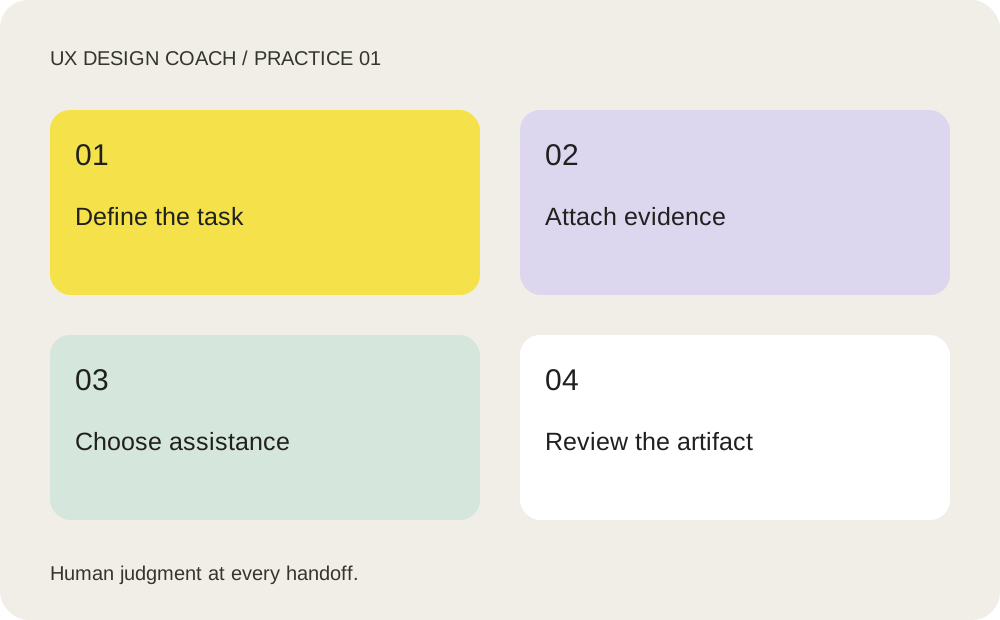
Do the work, step by step
- Choose one journey: for this course, improve booking a first consultation. Write the audience, task and decision you need to make.
- Collect approved inputs: current screens, real product rules, brand guidance and anonymized observations. List what is missing instead of asking AI to fill gaps with invented facts.
- Match work to a tool: Claude for synthesis and task execution, Claude Design for visual exploration, GPT-6 Astra for reasoning and critique, and Figma for design-system work and prototypes. Tool access depends on your account.
- Ask for a plan first, then one small artifact. Compare it to the brief, correct factual errors and save the accepted version.
A prompt to adapt
Replace the bracketed inputs with your own context. Copy this prompt into your chosen tool.
Act as my UX planning partner. Our task is [task], audience [audience], decision [decision]. Use only [approved inputs]. Separate evidence, assumptions and open questions. Propose a 45-minute workflow, one deliverable, acceptance criteria and a human review point. Do not invent user research or product capabilities.
Your practice assignment
Write a one-page brief for a consultation booking flow. Identify one unsupported assumption and the cheapest way to investigate it.
Review checkpoint
A reviewer should be able to name the task, trace each claim to an input, and explain what will be tested next.
Source and teaching context
OpenAI: GPT-6 Astra. Product and method references checked October 24, 2026. Exercises are UX Design Coach teaching recommendations, not measured tool benchmarks. Interfaces and plan access can change.
Get the free working templates →