
A tool call is an interaction. Someone still needs to understand what changed, whether it matched their intention and how to recover when it did not. WebMCP makes actions easier for browser agents to find, but it does not remove the design work around those actions.
Designers can shape the tool’s language, inputs, feedback and handoff. A useful starting exercise is a workshop finder: the agent can search and explain matches, while a person decides whether to register. That boundary is easier to inspect than a single opaque “handle everything” command.
Design six states before the happy path
| State | What the person should understand |
|---|---|
| Ready | Which account and task the tool will use. |
| Working | What action is happening and whether anything has been saved. |
| Needs information | The exact missing input and how to provide it. |
| Ready for review | The actual booking, recipient, price or record before commitment. |
| Completed | The result identifier and a link to the changed record. |
| Failed or uncertain | What is known, what may have happened and the safest recovery. |
Do not use the same “Done” message for a draft, a submitted request and a confirmed booking. When a network timeout follows a write, a blind retry can create a duplicate. The interface should check the result or offer a controlled recovery path.
A 45-minute design exercise
- Choose a real journey with one decision and one action.
- Sketch the six states above, including an expired session and an empty result.
- Write the tool name in plain language and specify the required inputs.
- Design a review panel that shows exactly what will change.
- Walk through the journey with a colleague playing the agent and another playing the customer.
- Record where either person has to guess. Revise the contract and feedback there.
This rehearsal evaluates clarity. It is not a substitute for observing real users or testing the actual browser integration. Preserve keyboard access, visible focus, readable errors and ordinary forms alongside agent tools.
MCP and WebMCP: what each one does
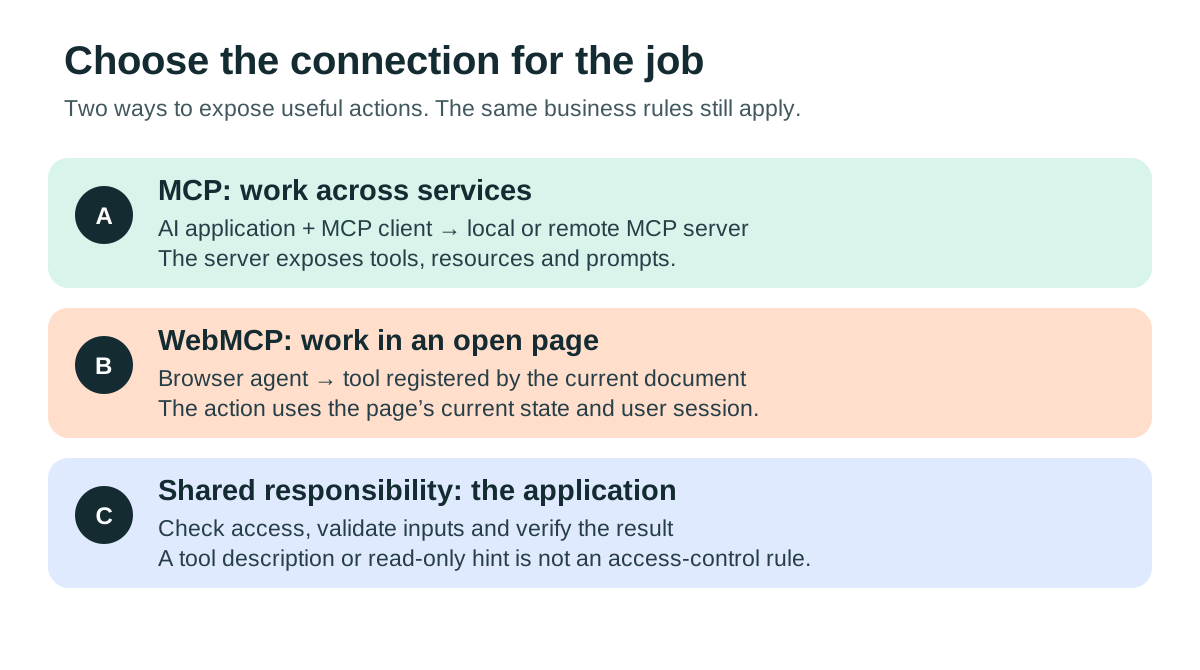
When people say “use an MCP,” they usually mean connect an AI assistant to an MCP server. Model Context Protocol gives an AI application a structured way to discover and call tools, read resources and use reusable prompts. The server is the program that exposes those capabilities; it may run locally or at a remote URL. It can wrap an API you already have.
WebMCP is a browser API proposal for tools exposed by the current webpage. The browser agent can ask for a named action with structured inputs instead of inferring every step from buttons, screenshots or page markup. It is useful when the open page and its session are part of the job. You can build a WebMCP tool without deploying a remote MCP server.
| Need | Start with | Example |
|---|---|---|
| Work across applications | MCP server | Look up approved project information from an assistant. |
| Act in an open webpage | WebMCP | Search the page’s catalog or select an available option. |
| Connect ordinary software services | Existing API | Apply your application’s business rules and permissions. |
| Delegate between independent agents | An agent-to-agent protocol | Coordinate separate agents; this is a different layer. |
Neither protocol grants extra account access. Tool names and annotations describe behavior; your application still has to enforce it. Keep pricing, eligibility, access control and validation in the same business logic used by the ordinary product.
Use an existing MCP: four steps
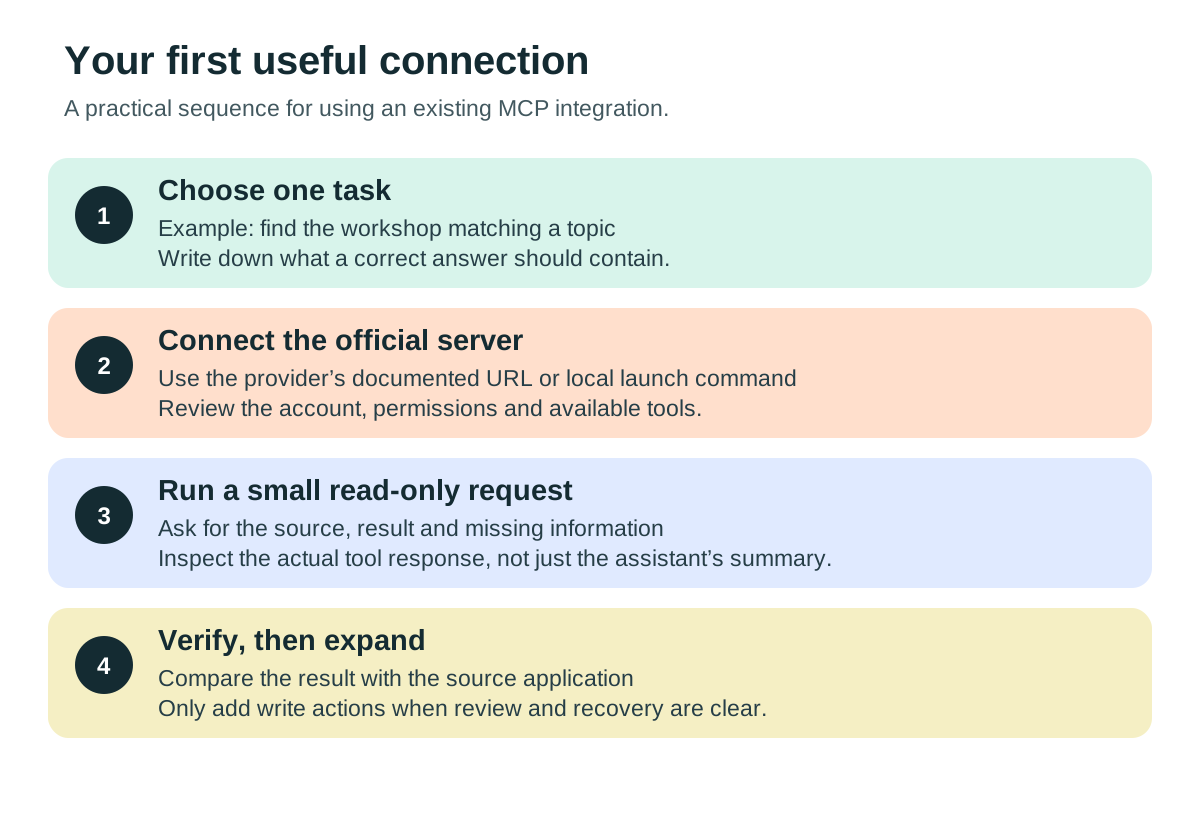
- Choose a narrow job. Write a request with an observable result, such as “find the three approved documents about onboarding and return their source links.” Start with information you can independently verify.
- Find the official connection. Follow the provider’s own setup page. A remote integration generally supplies a URL and may use an account authorization flow. A local server supplies a launch command and runs on your computer. A directory entry alone is not proof that a package is the provider’s official software.
- Review what it can do. Check the connected account and workspace, available tools, requested permissions and whether the assistant requires confirmation for changes. Use the narrowest useful access. Keep credentials in the host’s supported secret settings, not in prompts or public configuration files.
- Ask, inspect and verify. Run one read-only request. Compare the tool result with the original application. Record missing data, errors and which account was searched before moving to edits or automation.
Use the connected tool to find information about [topic]. Return the source links and the exact result. Separate missing information from facts. Do not change records or send messages.
If tools do not appear, check that your assistant supports the server’s transport, the connection is enabled, authorization has finished and your account has the required access. For local servers, check executable paths and logs. A successful connection is only the first test; the requested task still has to work.
Create an MCP server: start with one useful tool
You are building an adapter around a real capability. Define the contract before choosing a framework: what is the tool called, what input does it accept, what does success return, who may use it, and what happens when it fails?
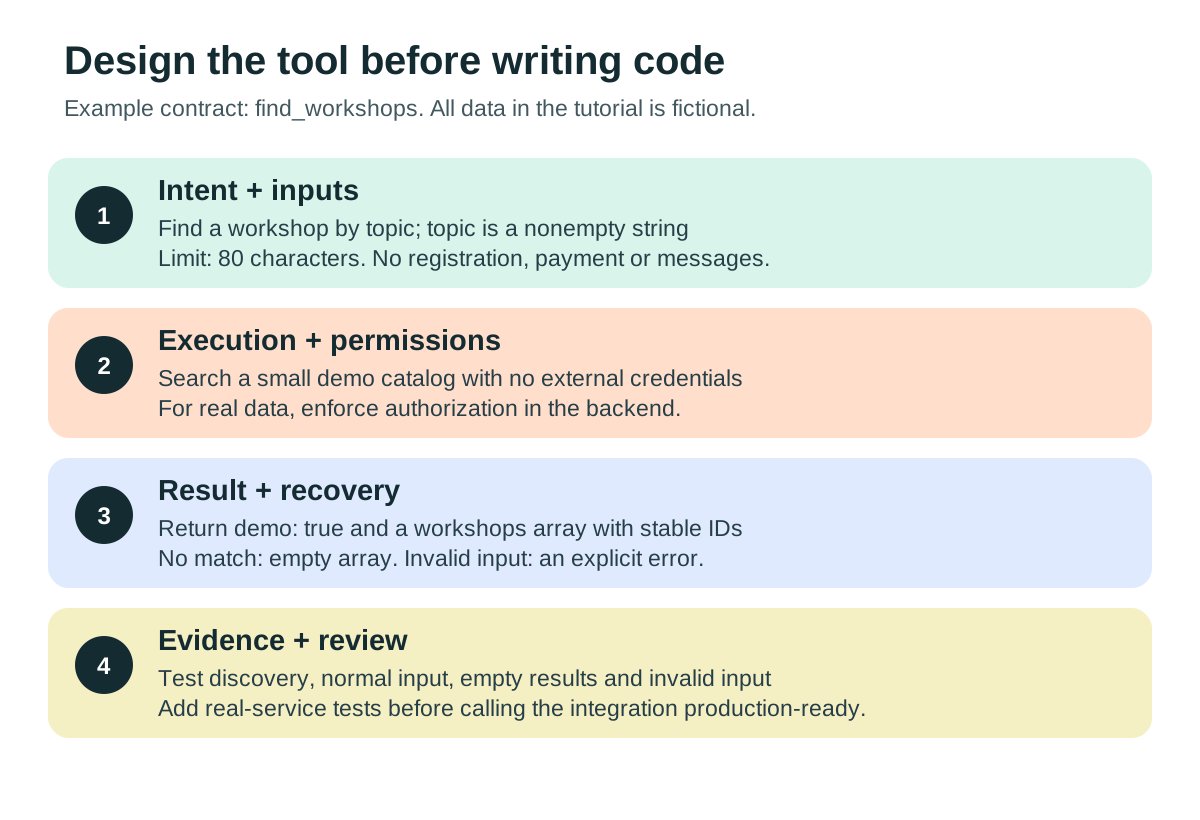
- Choose one read-only function. Our example searches two fictional workshops. It has no account credentials and cannot book, publish or charge anything.
- Describe inputs and outputs precisely. A topic is a nonempty string of up to 80 characters. Results contain stable workshop IDs and a
demo: truemarker. A valid search with no matches returns an empty array; invalid input returns an error. - Register the function with an official SDK. The Python example in the starter kit uses
FastMCPfrom the officialmcppackage’s v1 line. This is different from installing a separate package namedfastmcp. - Test discovery and execution. A tool that imports successfully may still fail when a client calls it. Exercise the actual protocol, including errors, before connecting an assistant.
- Connect a compatible host. Supply the absolute Python executable and server file paths. The host launches the local process and communicates over standard input/output, or stdio.
- Replace demo data deliberately. Integrate one real API, enforce user authorization, bound result sizes, set timeouts and return clear errors. For remote distribution, use Streamable HTTP and appropriate authentication; do not expose this unauthenticated local lab on the public internet.
Follow the full AI Teachers coding walkthrough for environment setup, the complete server, VS Code configuration and expected results. The starter kit on this page contains the same tested files.
Add a WebMCP tool to a webpage
The same catalog function can be exposed to a browser agent. Keep a normal search form, then register a tool when the API is available. The downloadable demo includes both paths and uses no external services.
- Serve the demo. Extract the kit and run
python -m http.server 8000from its folder. Openhttp://localhost:8000/demo.html; do not rely on opening a file URL. - Try the ordinary form first. Search for AI, MCP and a topic that does not exist. This is the behavior the tool must preserve.
- Use a supported test browser. Follow Chrome’s current WebMCP origin-trial or local-testing instructions. Check for
document.modelContextin the console. Availability varies by browser and configuration. - Register the tool. Use a precise name, description and JSON Schema. Reuse the same search function as the visible form.
- Discover and call it. Inspect the result, then compare it with the form. Clean up registration with an abort signal when the page is left.
const catalog = [
  { id: "intro-ai", title: "Introduction to AI", level: "beginner" },
  { id: "build-mcp", title: "Build an MCP server", level: "intermediate" }
];
export function findWorkshops(topic) {
  if (typeof topic !== "string" || !topic.trim() || topic.length > 80) {
    throw new Error("Use a topic between 1 and 80 characters.");
  }
  const query = topic.trim().toLowerCase();
  return { demo: true, workshops: catalog.filter(w =>
    w.title.toLowerCase().includes(query)) };
}
export async function registerWorkshopTool(doc = document) {
  if (!doc.modelContext) return null;
  const lifecycle = new AbortController();
  await doc.modelContext.registerTool({
    name: "find_workshops",
    description: "Search fictional workshops by topic. Never books a place.",
    inputSchema: {
      type: "object",
      properties: { topic: { type: "string", minLength: 1, maxLength: 80 } },
      required: ["topic"],
      additionalProperties: false
    },
    annotations: { readOnlyHint: true },
    execute: async ({ topic }) => findWorkshops(topic)
  }, { signal: lifecycle.signal });
  return lifecycle;
}
In a supporting browser, this console check exercises the registered tool:
const tools = await document.modelContext.getTools();
const tool = tools.find(t => t.name === "find_workshops");
if (tool) {
  console.log(await document.modelContext.executeTool(tool, { topic: "AI" }));
}
The Python protocol tests, browser search form and native WebMCP tool calls were tested for this guide. Browser support still varies: verify the integration in the specific browsers and assistant environments you plan to support. For a real booking or checkout, return an explicit review state, keep the visible page synchronized, and obtain meaningful confirmation before committing the consequential action.
What companies have actually shown
| Example | Verified implementation or evidence | What to take from it |
|---|---|---|
| Shopify | Storefront tools expose catalog and cart actions. Checkout support can hand control back for buyer confirmation or challenges. | Test your actual theme, checkout and payment path; platform support does not prove every customization works. |
| Stripe | Its September engineering study reported 42% fewer tokens, 38% fewer tool calls and 39% faster completion. | The study used 60 checkout runs across six models with a fictional retailer, split between WebMCP and baseline. It did not establish merchant sales lift. |
| Lovable | The October 13 changelog added browser tools alongside agent integrations, with an option to use WebMCP without an MCP server. | Review the generated tools and their scope rather than assuming every app action should be exposed. |
| Cloudflare + Commerce.com | A beta edge bridge can expose existing commerce tools. | Infrastructure can carry tool definitions; it cannot invent correct business rules for an arbitrary site. |
| Meta | Official developer examples demonstrate voice-driven web-app actions for glasses. | Examples and rollout documentation are not proof of universal device availability or measured production impact. |
A separate Shopify benchmark by Gil Greenberg reported average completion falling from 27.4 to 10.3 seconds and 58% lower cost in controlled checkout tasks. That is about 2.7 times as fast for those tasks. Treat it as motivation to run your own evaluation, not a forecast for your store. The source’s aggregate attempt counts are inconsistent, so we do not repeat a sample-size claim.
A practical five-day pilot
| Day | Work | Evidence to keep |
|---|---|---|
| 1 · Choose | Pick one frequent task and a clear definition of done. | Baseline completion, errors and time for representative cases. |
| 2 · Specify | Write the tool contract and account boundaries. | Inputs, outputs, permission checks, error states and an owner. |
| 3 · Implement | Wrap existing business logic with one read-only tool. | A working tool plus a human fallback. |
| 4 · Break it | Test invalid input, no results, timeouts, expired sessions and access to another account’s records. | Expected versus observed results; unresolved failures. |
| 5 · Compare | Repeat the same tasks with the same model and starting conditions. | Verified success, latency, cost, retries and handoffs. |
Track cost per successful task, not only cost per attempt. Record median and slow-tail completion times, tool errors, human interventions and duplicate actions. Compare like-for-like tasks. A tiny learning pilot can expose obvious problems; it cannot prove a statistically reliable revenue lift.
For changes such as creating bookings, updating a CRM or issuing a refund, add a review step with the actual details. Enforce permissions on the server, defend against repeated requests, record the result ID, and provide recovery. Treat text returned from third-party content as data, not instructions that can override the user’s request. Keep secrets and unnecessary personal information out of results and logs.
Proceed when the task is useful, results are verifiable and failures are recoverable. Pause when permissions are unclear, source data is unreliable or there is no owner to maintain the connection. Neither MCP nor WebMCP automatically improves search rankings, creates demand or guarantees agent traffic.
Try it yourself
Download the Python server, protocol tests, browser demo, example host configuration and editable pilot worksheet. No email required.
Download the starter kit (.zip)Open the browser demoThe catalog is fictional. The kit demonstrates the connection mechanics; it is not a deployed booking integration.
Common questions
Do I need to create an MCP server to use an existing one?
No. Connect the provider’s server using its documented setup and a compatible assistant. Build your own only when you need a capability the existing tools do not provide.
Does WebMCP replace a normal website or API?
No. Keep the human interface and the backend’s business rules. WebMCP exposes selected page actions to compatible browser agents.
Will this automatically improve traffic or revenue?
No. Structured actions can make a supported task easier to perform. Discovery, customer demand and commercial results need their own evidence.
Continue with the guide for your role
- AI Product Manager — MCP and WebMCP for product teams: from promising demo to useful feature
- AI Teachers — MCP and WebMCP, step by step: connect a tool, build a server, try it in a browser
- EcomCoach — WebMCP for ecommerce: test the shopping journey before promising more sales
- Waymaker Agency — Build a useful MCP integration: a practical implementation plan for small teams
Sources and further reading
- MCP architecture
- Python SDK v1 maintenance documentation
- Python SDK v2 and migration
- Connect an MCP server in VS Code
- Chrome WebMCP overview
- Current imperative WebMCP API
- WebMCP draft specification
- Shopify storefront tools
- Shopify checkout support
- Shopify benchmark by Gil Greenberg
- Stripe checkout engineering study
- Lovable product changelog
- Cloudflare and Commerce.com
- Meta WebMCP examples
Original guide and teaching examples by Ashley Kays. Inspired by the questions raised in Department of Product’s WebMCP coverage; independently written and checked against the primary sources above. Sources reviewed November 15, 2026. Cover: AI-generated conceptual illustration. Diagrams: original explanatory graphics. Demo workshops are fictional.