Tools & comparisons
7 UX design and research tools: choose your next useful upgrade
Compare tools for interface design, usability research, workshops, forms, and publishing—with a concrete task to test each one.
In this guide
- The useful starting point
- 1. Figma: interface design and team handoff
- 2. Penpot: open-source interface design
- 3. Framer: portfolio and marketing-site publishing
- 4. Maze: structured usability studies
- 5. Dovetail: research evidence and synthesis
- 6. Miro: collaborative mapping and workshops
- 7. Tally: research recruitment and intake forms
- Build a stack around your next deliverable
- Use the same evaluation task
- How we chose this shortlist
- Sources and further reading
The useful starting point
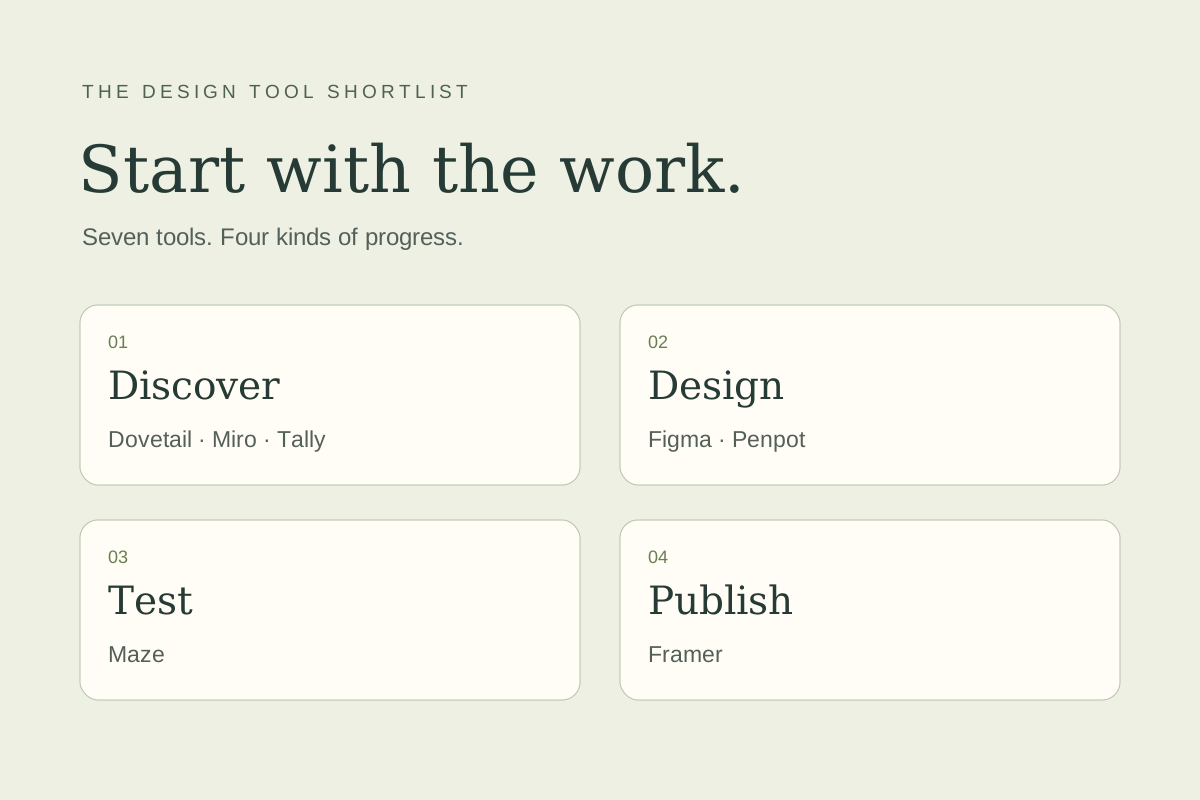
Choose for the next deliverable: Figma or Penpot for interfaces, Framer for a published site, Maze for studies, Dovetail for research evidence, Miro for workshops, and Tally for forms.
A useful design stack carries a question from discovery to a reviewed decision. These seven tools cover different stages, so choose the gap you need to solve first.
| Tool | Category | First thing to test |
|---|---|---|
| Figma | Interface design and team handoff | Build one form with success and error states. Ask a developer to identify component properties and inspect the implementation requirements. |
| Penpot | Open-source interface design | Recreate a small reusable component, share it with a collaborator, and inspect the handoff. Include hosting and maintenance in a self-hosted comparison. |
| Framer | Portfolio and marketing-site publishing | Publish a small test page. Check keyboard navigation, mobile layout, CMS limits, form delivery, and the handoff to the person who will update it. |
| Maze | Structured usability studies | Write one realistic task, pilot it with two people, and verify that your plan covers the study type, participant recruitment, and reporting you need. |
| Dovetail | Research evidence and synthesis | Import permitted sample material, create a theme, and trace each claim back to its source. Check access controls, exports, user charges, and AI credits. |
| Miro | Collaborative mapping and workshops | Run a short workshop with one remote participant. Check guest access, facilitation, export quality, and whether the output becomes a clear decision. |
| Tally | Research recruitment and intake forms | Build a screener with branching, a consent statement, and a confirmation. Test accessibility and export the response into your working process. |
1. Figma: interface design and team handoff
A good fit when: Your team shares components, reviews flows, and hands designs to developers.
Consider another option when: The whole project is a single marketing site; compare a publishing tool before adding a separate design-to-build handoff.
Try this: Build one form with success and error states. Ask a developer to identify component properties and inspect the implementation requirements.
Cost and plan check: Choose Full, Dev, or Collab seats by role; check plan requirements and AI credit allowances instead of budgeting every participant as an editor.
2. Penpot: open-source interface design
A good fit when: You want an open-source design environment and need to evaluate hosting and team control.
Consider another option when: Your workflow depends on a specific Figma-only plugin or library.
Try this: Recreate a small reusable component, share it with a collaborator, and inspect the handoff. Include hosting and maintenance in a self-hosted comparison.
Cost and plan check: Choose managed cloud or self-hosting; include infrastructure and administration work in self-hosted cost. Paid governance/storage/history needs differ from core design features.
3. Framer: portfolio and marketing-site publishing
A good fit when: The deliverable is a responsive, published website with content and interactions.
Consider another option when: You are building a complex application with substantial backend logic.
Try this: Publish a small test page. Check keyboard navigation, mobile layout, CMS limits, form delivery, and the handoff to the person who will update it.
Cost and plan check: Compare CMS collections, bandwidth, editor access, localization, and testing/hosting add-ons before choosing the site plan.
4. Maze: structured usability studies
A good fit when: You have a clear question and need to collect task-based feedback from participants.
Consider another option when: You are still deciding what question the research should answer.
Try this: Write one realistic task, pilot it with two people, and verify that your plan covers the study type, participant recruitment, and reporting you need.
Cost and plan check: Match the plan to research methods, participant recruitment, and team access. Maze MCP is shown as Enterprise; ask for a quote covering your actual study volume.
5. Dovetail: research evidence and synthesis
A good fit when: Interviews and feedback are scattered and your team needs a shared evidence base.
Consider another option when: A small project can be managed well in a folder and a concise research document.
Try this: Import permitted sample material, create a theme, and trace each claim back to its source. Check access controls, exports, user charges, and AI credits.
Cost and plan check: Dovetail One's recently announced model includes platform, users, and shared AI credits. Confirm the plan and credit budget offered to your account; older per-seat comparisons can be stale.
Explore Dovetail · Review plans
6. Miro: collaborative mapping and workshops
A good fit when: The team needs to align on a journey, problem, or service process together.
Consider another option when: The primary deliverable is a detailed interface specification.
Try this: Run a short workshop with one remote participant. Check guest access, facilitation, export quality, and whether the output becomes a clear decision.
Cost and plan check: Check private board and external guest needs. Free-plan boards are available to the whole team; paid plans and AI credit allowances matter for client work.
7. Tally: research recruitment and intake forms
A good fit when: You need a fast form for screening participants or receiving design requests.
Consider another option when: The project needs a dedicated moderated-testing or research-repository system.
Try this: Build a screener with branching, a consent statement, and a confirmation. Test accessibility and export the response into your working process.
Cost and plan check: Free forms/submissions remain subject to fair use. Paid features include removing branding, custom domains, collaboration, and advanced notifications.
Build a stack around your next deliverable
- A product flow: start with Figma or Penpot. Add research tooling when you have a defined study.
- A portfolio or service website: compare Framer with your existing publishing tool before introducing another handoff.
- A research practice: use Tally for intake, Maze for a suitable study, and Dovetail when a shared evidence repository becomes useful.
- A cross-functional workshop: choose Miro when participation and shared mapping are the immediate need.
Use the same evaluation task
Give the two shortlisted tools the same input and a 45-minute time limit. Record setup time, collaboration friction, export quality, and how easily someone else can continue the work. Ask one colleague to use the result without an explanation. That handoff often reveals more than a feature checklist.
How we chose this shortlist
We selected tools across interface design, testing, research organization, facilitation, and publishing. Inclusion reflects the workflow each product can support; you do not need all seven. We compared the vendors’ published capabilities, pricing structure, collaboration options, and practical limitations. The order follows the work; it is not a numerical score or a hands-on performance ranking. Product information checked November 10, 2026. Follow the pricing links for current plans and limits.
Continue with the Figma MCP workshop or browse all practical design guides.
Sources and further reading
- Figma product and plan details
- Penpot product and plan details
- Framer product and plan details
- Maze product and plan details
- Dovetail product and plan details
- Miro product and plan details
- Tally product and plan details
Sources checked November 10, 2026. Review the linked publisher information for current details.
Put one idea to work
Take the next step with a practical worksheet, a clear research question, and a standard you can use to review the work.
Explore design worksheets →Explore more from UX Design CoachGet design practice in your inbox →Keep practicing
 Agent-friendly websites
Agent-Friendly Website UX: A Practical Audit Checklist
A practical UX guide to agent-friendly websites: accessible controls, clear states, llms.txt, task testing and a worked booking-flow example.
November 11, 2026 · 8 min read AI browser workflows
Use ChatGPT and three browser tabs for a more useful UX review
Compare visible interface patterns, keep observations separate from assumptions, and turn the review into one design question. Includes five illustrated steps and an example evidence log.
November 11, 2026 · 8 min read