Useful AI Beats Hype · Design
Create a design-review skill that produces specific, testable improvements
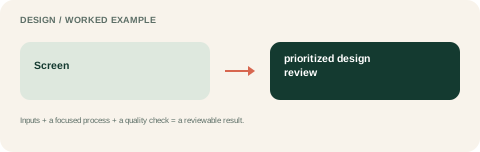
A ranked review with observed evidence, likely user impact, proposed changes and validation steps.
In this guide
- How do I build a useful AI skill?
- Keep the illustrated guide
- What you will build
- Gather the inputs
- 1. Name the user task
- 2. Inspect the evidence
- 3. Rank the friction
- 4. Offer concrete changes
- 5. Plan validation
- A worked example
- Copyable skill instructions
- Three tests to run
- How to judge whether it helps
- What to build next
- Bring a real task.
- Explore the six-part skills series
- Sources and further reading
How do I build a useful AI skill?
Choose one recurring task, define its inputs and output, write the workflow and quality checks, then test the skill with complete, incomplete and conflicting inputs.
By Ashley Kays. Worked examples use fictional inputs; expected results are illustrations for testing, not performance claims.
"Make it cleaner" is difficult to act on. A focused review skill connects what is visible on a screen to a user goal, explains the likely problem and suggests a change you can test. It also makes clear what a screenshot cannot establish.
What you will build
A ranked review with observed evidence, likely user impact, proposed changes and validation steps.
Gather the inputs
A screenshot or inspectable design; target user; primary task; important device sizes; design-system guidance; known research and constraints.
1. Name the user task
State what a person is trying to accomplish. A checkout review and an onboarding review need different priorities.
2. Inspect the evidence
Require each observation to identify a visible element or an inspected behavior. Mark anything outside the evidence as unknown.
3. Rank the friction
Use reasoned severity and confidence. A blocked primary action should outrank a decorative inconsistency.
4. Offer concrete changes
Write revised labels, reorder specific content or sketch a clearer hierarchy. Tie every change to the user task.
5. Plan validation
Test the primary flow with users. Check interaction, keyboard behavior and semantics in the live implementation when available; do not certify them from an image.
A worked example
Fictional screen: an onboarding form shows three equally prominent buttons: Save, Continue and Finish. User goal: complete setup. Only a screenshot is available.
Observation: three competing actions have similar visual weight. Hypothesis: people may be unsure which completes setup. Proposal: clarify the main action as "Finish setup" and make save-for-later secondary if that behavior exists. Validate task completion. Keyboard order, labels in code and responsive behavior remain unverified.
Copyable skill instructions
Use this focused template in the skill-creation flow described in the starter guide. Review and adapt it to your own work before saving. It is not installed by downloading this article.
---
name: task-focused-design-review
description: >-
  Review a supplied screen or flow against a stated user task. Use for actionable UX
  feedback, not unsupported research claims or accessibility certification.
---

# Screen to prioritized design review
Require a user task and inspectable evidence. Separate visible observations, hypotheses and recommendations. For each issue, name the location, evidence, likely impact, severity rationale, confidence, proposed change and validation. Respect the supplied design system. Do not invent usability studies or behavior outside the evidence. For screenshot-only reviews, leave keyboard, semantics and interaction checks unverified. Draft changes; do not silently edit or publish designs.

Required output: A ranked review with observed evidence, likely user impact, proposed changes and validation steps.
Three tests to run
| Test prompt | Pass condition |
|---|---|
| Normal: screen, task and design-system rules | Specific observations with useful proposed changes. |
| Missing: screenshot only, no working flow | Interaction and code-level accessibility remain unverified. |
| Conflict: aesthetic preference hurts the primary task | Explain the tradeoff and prioritize the documented user goal. |
How to judge whether it helps
Track how many findings are actionable and how the revised flow performs in validation. Count evidence-backed improvements rather than the number of critiques.
What to build next
Next skills: UX copy review, research-plan drafting, design-system conformance, prototype test planning.
Return to the illustrated setup guide and official sources.
Bring a real task.
Leave with a working AI-assisted process. Ashley and the Waymaker team can help you choose the workflow, create the skill, test it and make it useful for your team.
Book a 15-minute fit callExplore the six-part skills series
Sources and further reading
- OpenAI: Build skills
- Claude: Create custom skills
- Claude: Use skills
- Claude Code: Extend Claude with skills
- Agent Skills: Format specification
Sources checked November 1, 2026. Review the linked publisher information for current details.
Put one idea to work
Take the next step with a practical worksheet, a clear research question, and a standard you can use to review the work.
Explore design worksheets →Explore more from UX Design CoachGet design practice in your inbox →Keep practicing
 Remote work & AI
UX expertise, remote freelancing, and AI evaluation: a Mercor guide
Designers bring more than screen-making skills. Learn how to describe your research and interaction judgment when exploring remote AI work through Mercor—and how to prepare without overstating what you know.
October 31, 2026 · 5 min read AI agents
Grok Bot for UX: design templates, Dots, Duet, and research boundaries
How Grok Bot works, templates you can inspect, and a practical comparison with Dots, Claude Duet, Muse, Manus and Copilot Studio for a design critique and evidence brief.
October 28, 2026 · 7 min read